

The Best WordPress Security Plugins Compared
WordPress delivers extensive personalization, scalability, and community support, but with a caveat: WordPress sites can be incredibly vulnerable. The very flexibility that makes this content management system (CMS) so appealing can deliver added risks: vulnerability exploits, brute force attacks, and SQL injection attacks, to name a few.
There are many ways to help combat these attacks, but security plugins play an important role in a layered WordPress security approach. These cost-effective solutions protect websites against common hazards, offering defenses that typically include malware scanning, monitoring, and remediation.
With so many security plugins available, however, finding the right solution can take careful evaluation. Each provider delivers a unique set of features, with tiered plans making these offerings even more complex to navigate.
For site owners who want coverage across multiple security layers without unnecessary complexity, SiteLock takes a more comprehensive approach. The sections below compare the SiteLock plugin with other well-known WordPress security plugins to highlight how each solution approaches protection.
Why does WordPress need more security than what’s built in?
Although we will discuss a range of options for boosting WordPress security, it's worth mentioning that this content management system is actually quite secure compared to many other platforms, even right out of the box. Unfortunately, today's threat actors are incredibly sophisticated; existing WordPress defenses simply can't keep up with the extraordinary speed and scale of today's attacks.
Amid these evolving challenges, robust, plugin-enhanced security delivers greater peace of mind for website owners. These solutions, like WordPress sites themselves, are tailored to reflect site-specific needs. The best WordPress security plugins address a range of advanced risks that the CMS, on its own, is not designed to stop.
What WordPress core security already does well
WordPress benefits from an active developer community that regularly releases security updates and patches to address known vulnerabilities as they emerge. The platform also provides documentation and guidance to help site owners and developers maintain secure configurations.
Role-based permissions define user capabilities, supporting the well-regarded security principle of least privilege, meaning users should only access features they actually need. Meanwhile, health checks pinpoint developing concerns, ensuring these are noticed and addressed before they lead to bigger security issues.
Where does the built-in security fall short?
Although WordPress offers many built-in security solutions, additional protection is needed to fully safeguard websites against threats. Without plugins, security gaps can be expected. For example, WordPress does not offer proactive malware scanning or cleanup, so without added protection, infections may go unnoticed, allowing for ongoing compromises without triggering alerts.
The WordPress login page represents another huge area of concern, especially as centralized protection is not offered by default. Unlimited login attempts open the door to brute force attacks, and, with minimal logging and monitoring features built in, major threats or compromises could be left undetected.
Which WordPress security plugin is the best?
Many plugins promise to boost security, with each plugin offering its own unique advantages.
This guide compares leading WordPress security plugins across key criteria: scanning approach, performance impact, ease of setup, and breadth of protection. Whether you're a small business owner, developer, or agency managing multiple sites, understanding these differences will help you choose the right solution.
We assessed each plugin across five criteria:
- Scanning Approach: On-server vs. cloud-based, and performance impact
- Core Security Features: Hardening, login protection, malware detection, Activity logging and forensics, and Vulnerability scanning for plugins/themes
- Ease of Use: Setup time, interface clarity, and ongoing maintenance
- Scalability: Free tier value and upgrade path flexibility
- WordPress-Specific Protection: Tailored controls vs. generic security, ability to manage security without leaving WordPress
Our goal: identify which plugins deliver comprehensive protection without unnecessary complexity or performance trade-offs.
Side-by-side comparison
Feature |
SiteLock |
Wordfence |
Sucuri |
MalCare |
Solid Security |
|---|---|---|---|---|---|
Cloud-based scanning |
✔ |
✖ |
✔ |
✔ |
Mixed |
On-server impact |
Minimal |
High |
Minimal |
Minimal |
Medium |
Free tier |
✔ |
✔ (limited) |
✔ (limited) |
✔ (limited) |
✖ |
Activity logging |
✔ |
✔ (Premium) |
✔ |
✖ |
✔ |
Hardening controls |
✔ (4 toggles) |
✔ |
✔ |
Limited |
✔ |
2FA |
Coming soon |
✔ |
Service plan |
✖ |
✔ |
SiteLock’s WordPress security plugin
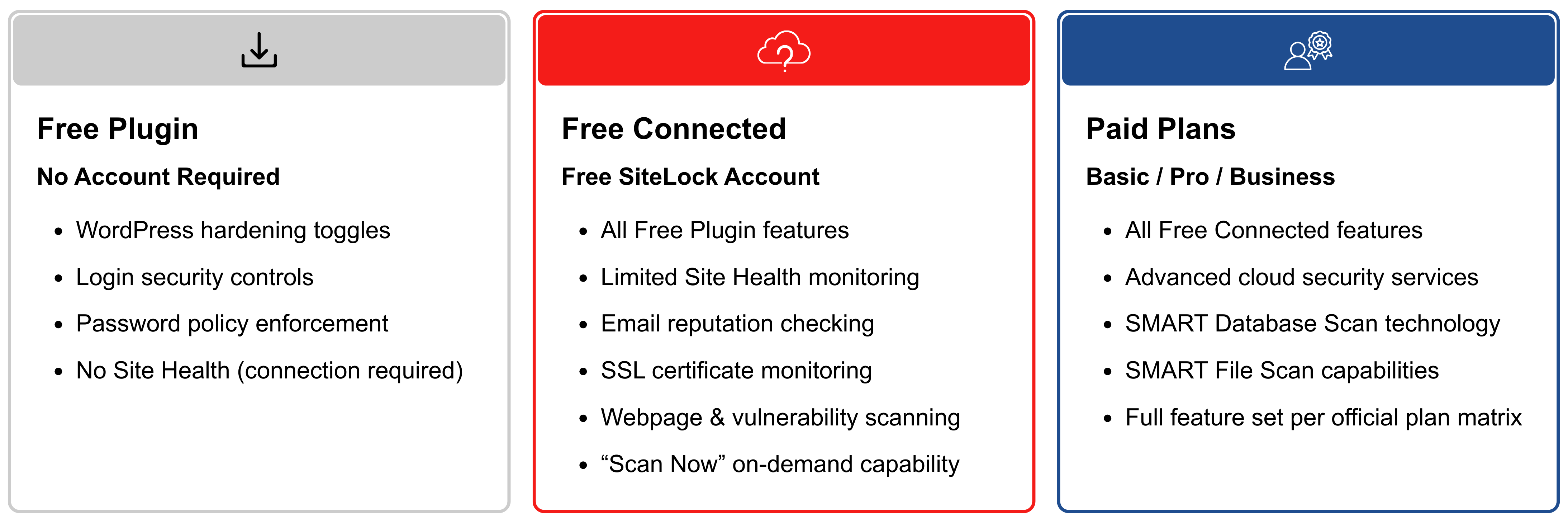
SiteLock’s all-new WordPress security plugin focuses on scanning, hardening, and login protection in a single tool. It's free to use (with paid options available), user-friendly, and designed to improve security while minimizing setup and ongoing maintenance.
Key features:
- Cloud-based scanning and checks that run off-server, helping maintain site performance while assessing security posture. The plugin is free to install, providing immediate baseline protection.
- On-demand and recurring security checks that allow site owners to run immediate scans after plugin/theme updates or rely on scheduled cloud checks over time. Connecting a free SiteLock account unlocks additional cloud-based visibility and monitoring.
- Action-first controls that reduce configuration complexity and make it easy to improve quickly, even for non-technical users.
- WordPress-specific hardening toggles (4 one-click controls) that close the attack vectors responsible for 70%+ of WordPress compromises: exposed directories, unsafe scripts, injection attacks, and upload exploits.
- Built-in login hygiene tools that enforce stronger passwords and limit brute-force attempts.
- Activity Log for tracking login events, admin actions, and security events with role-based filtering and forensics capabilities.
- Integrated site health visibility within the WordPress admin, providing a clear view of protection status and recent security checks.
- Seamless upgrade path that allows protection to scale by linking a SiteLock account, unlocking advanced cloud services including firewall protection, CDN capabilities, deeper malware scanning (SMART Database and File Scans), and comprehensive monitoring by connecting a paid SiteLock account—all accessible directly from the WordPress plugin interface.
- Two-Factor Authentication (2FA) to strengthen login security is a feature currently being built and coming soon.
SiteLock’s security plugin delivers balanced, cloud-based protection without placing unnecessary strain on server resources. Its focus on clarity, performance, and WordPress-specific controls makes it well-suited for a wide range of websites and offers the flexibility to expand coverage as security needs evolve.
Cloudflare
Cloudflare is best known as a CDN that improves site speed and offers security at the network edge. Its free WordPress plugin provides a convenient entry point for performance and baseline protection.
Key features:
- Protection at the edge, with the free option offering solid protection against a range of potential hazards.
- Traffic filtering that intercepts malicious traffic before it reaches the server, safeguarding sensitive data while also limiting server strain.
- One-click setup with minimal technical overhead.
- Optional add-on features such as automatic platform optimization (APO) for faster load times and improved user experiences.
Considerations
Cloudflare typically works best as a complementary layer rather than a standalone WordPress security solution. Visibility into WordPress-specific activity, such as admin behavior, user actions, and internal file changes, is limited compared to other plugin options.
Sucuri
The cloud-based security platform Sucuri offers a free WordPress security plugin that provides baseline protection, with the option to add service-based security plans for expanded coverage and additional security features.
Key features:
- Security activity audits that log security-related events within the WordPress environment to help track changes.
- File monitoring to detect unauthorized file modifications.
- Remote malware scanning that checks for malicious code.
- Blocklist monitoring that alerts site owners if their site is flagged by major blocklisting services.
- Hardening options that apply recommended configuration changes to reduce common attack vectors
Considerations:
While Sucuri has many different options available, some could be considered expensive for users. Broader protection relies on service-based plans, which introduce additional cost and configuration considerations.
Wordfence
The Wordfence plugin offers enterprise-style WordPress security with a range of features and pricing tiers. The Premium option ups the feature toolset, adding real-time threat detection, customer support, and detailed security logs. Other options with additional costs include hands-on customer support with Wordfence Care and one-hour responses with Wordfence Response.
Key features:
- Blocks malicious traffic and detects harmful code.
- Strengthens login security with two-factor authentication to help limit brute-force attempts.
- Administrators get clear visibility into traffic and threats within the interface.
- The free version offers baseline protection while premium plans add audit logging and malware cleanup services.
Considerations:
Because Wordfence runs on-server, resource usage can become a concern for sites on shared or limited hosting. Its extensive feature set may also require hands-on tuning to balance alerts, scans, and performance, something less technical users may find challenging.
MalCare
The MalCare plugin emphasizes cloud-based scanning and malware detection, making it attractive for resource-constrained hosting environments. It offers one-click malware removal through its paid plans.
Key features:
- Cloud-based scanning that minimizes server load.
- One-click malware removal on higher-tier plans.
- Clean interface that’s easy to navigate.
- Multiple plans are designed for different needs.
Considerations:
Advanced protection features, including website hardening, are primarily available on higher-priced plans.
Solid Security (SolidWP)
Formerly known as iThemes, SolidWP offers a set of tools to protect WordPress sites. Options include security management tools, as well as cloud storage and backup options. SolidWP offers four different plans for different price ranges.
Key features:
- Password protection and multi-factor authentication.
- Security hardening is integrated with site management features.
- Firewall provided by Patchstack.
- Vulnerable plugin and theme scanning within the WordPress system.
Considerations:
Solid Security targets prevention, while remediation and incident response capabilities are more limited. Users who require malware cleanup or hands-on recovery support may need to rely on additional tools or services.
Understanding performance impact: On-server vs. cloud-based scanning
One of the most critical but overlooked differences between WordPress security plugins is “where” they run their scans. This choice fundamentally affects your site's speed, server performance, and user experience.
On-server scanning (Wordfence, Solid Security)
How it works: Security scans run directly on your WordPress hosting server, consuming CPU and memory resources alongside your website.
Pros:
- Real-time file system access
- Immediate threat detection
- No external dependencies
Cons:
- Can slow page load times during scans
- May trigger resource limit errors on shared hosting
- Increases server costs on metered hosting plans
- Can affect Core Web Vitals scores (impacting SEO)
Best for: Sites on dedicated or VPS hosting with ample resources, where technical teams can tune scan schedules and resource allocation.
Cloud-based scanning (SiteLock, Sucuri, MalCare)
How it works: Security scans execute on the provider's infrastructure. The plugin acts as a lightweight connector, sending data to external servers for analysis and receiving results back.
Pros:
- Minimal impact on site performance
- No server resource consumption
- Works reliably on shared/budget hosting
- Maintains Core Web Vitals scores
- Can perform deeper analysis without time constraints
Cons:
- Slight delay between scan initiation and results
- Requires external connectivity
- Data leaves your server (encrypted in transit)
Best for: Small businesses, blogs, and any site on shared hosting where performance matters or resources are constrained.
The SiteLock approach: Best of both worlds
SiteLock's plugin runs local controls (hardening, login security) directly in WordPress for immediate protection, while deep scans run in the cloud to avoid performance impact. This hybrid approach delivers:
- Instant protection from hardening toggles and login controls (no cloud services needed)
- Comprehensive scanning without server strain
- On-demand "Scan Now" capability after plugin/theme updates
- Always-on monitoring that doesn't slow down your site
Real-world impact: Sites using SiteLock's cloud-based approach maintain their performance benchmarks while gaining enterprise-grade security scanning - ideal for sites where speed directly impacts revenue or user retention.
Setup complexity: How long until you're protected?
Security plugins vary dramatically in time-to-value. Setup complexity affects how quickly you can achieve baseline protection and whether you'll actually complete the configuration
Here's what to expect from SiteLock and other plugins from initial installation to fully functional protection:
Fast Setup ~5 minutes
- SiteLock: 4 simple steps
- Technical skill required: Minimal. Clear toggle switches with plain-English explanations.
- MalCare: Simple setup
- Technical skill required: Minimal. Limited configuration options.
Moderate Setup (10-20 minutes)
- Cloudflare: Requires DNS changes (technical knowledge)
- Wordfence: Extensive configuration options require security knowledge to configure optimally.
- Sucuri: More streamlined than Wordfence, but requires some security understanding.
Complex Setup (20+ minutes)
- Solid Security: Comprehensive wizard includes many decisions.
For most WordPress site owners, faster setup means faster protection. SiteLock leads in this category, getting baseline security active in under 5 minutes. Wordfence and Solid Security offer more granular control but require significantly more configuration time and expertise.
Bottom line: If you need protection immediately without deep security expertise, choose SiteLock or MalCare. If you're a developer comfortable with security configuration, Wordfence's depth may justify the extra time investment.
Which plugin is right for you?
Every WordPress site is different. Here's how to choose based on your specific situation:
- On-server solutions like Wordfence provide deep control and real-time blocking but consume server resources and require configuration expertise. They're ideal for developers on dedicated hosting who want granular control.
- Cloud-based options like SiteLock and MalCare prioritize performance and simplicity. They deliver comprehensive scanning without slowing your site, perfect for small businesses that need protection without complexity.
- Infrastructure-layer tools like Cloudflare excel at network-level threats (DDoS attacks, bot traffic) but need complementary plugins for WordPress-specific protection.
SiteLock: The balanced choice
SiteLock stands out for its unique balance:
- WordPress-specific controls designed for common attack vectors
- Comprehensive protection without performance penalties (cloud-based scanning)
- Intuitive setup without extensive configuration (5-minute, 4-step process)
- Strong free tier with real value (hardening + login security at no cost)
- Flexible scaling without tool-switching (seamless upgrade path)
For most WordPress site owners, especially those on shared hosting, running small businesses, or managing sites without dedicated security teams, SiteLock delivers the right protection.
Ready to secure your WordPress site?
Still have questions? Contact our team or explore the plugin guide to learn more.
Don't leave your WordPress site unprotected. The best time to secure your site was yesterday. The second-best time is now.
Latest Articles




Categories
Archive
Follow SiteLock


