

SiteLock WordPress Security Plugin
Fast to set up. Light to run. Harden WordPress the easy way.
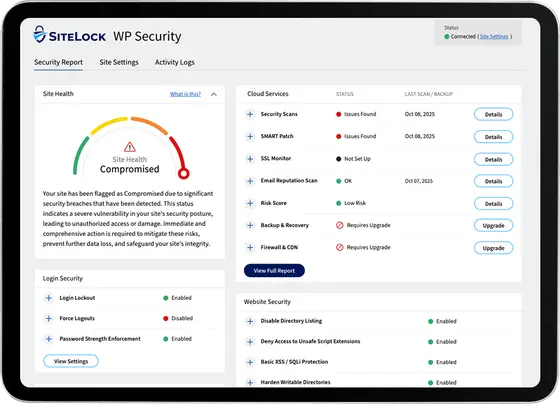
Protect your WordPress website with our free security plugin. Toggle WP-specific hardening, tighten login security, view your Site Health score and activity logs, and run off-server cloud checks - all inside WP Admin.
Sign up for a free SiteLock account here, install the plugin through your WordPress admin or through WordPress.org, and connect your account to activate cloud-based scanning. You can also connect an eligible paid SiteLock plan for deeper malware scanning, automatic malware removal, backups, and additional protection.
What does the free plugin include?
- Ready-to-apply WP-specific hardening toggles to reduce common attack paths
- Built-in login hygiene: enforce strong passwords, enable two-factor authentication (2FA), limit brute-force attack attempts, and session timeouts
- View WordPress Site Health score and cloud scan results* without leaving WordPress
- On-demand malware scanner and recurring cloud checks*
* Available after connecting a free SiteLock account
Benefits of the plugin
The SiteLock plugin helps secure WordPress by focusing on high-impact protections delivered in a simple, lightweight way:
- Action-first baseline - WordPress-specific hardening and core login protection in minutes, delivering quick wins without a maze of settings
- Light footprint - Cloud checks run off your server, so your site stays fast without heavy, on-server scans
- Built for clarity - Site Health view with a security summary for an at-a-glance posture check
- Assurance on demand - Run cloud security scans after updates or changes for immediate visibility
How does it work?
The SiteLock WordPress security plugin works directly inside WP Admin, giving you real-time visibility into site health and security. Use simple controls to apply WordPress hardening, then connect a free SiteLock account to run off-server cloud checks that validate changes without slowing your site.
The plugin provides baseline protection focused on prevention and visibility rather than full malware removal.
For live attack blocking, malware cleanup, and performance optimization, connect a full SiteLock plan. This will also enable a web application firewall (WAF) and content delivery network (CDN).

WordPress hardening
Toggle on WordPress-specific hardening to mitigate common cyberattacks, including DDoS attacks, SQL injection, and cross-site scripting (XSS) attempts.

Login hygiene
Enforce password policies, enable 2FA, gain visibility into login activity, limit login attempts from brute-force attacks, and set session timeouts.

Site Health & activity in WP Admin
See an overall Site Health security score; run on-demand scans and schedule recurring cloud checks (free SiteLock account required).

Free to start, easy to expand
Connect a free SiteLock account now, then add deeper malware scanning, automatic malware cleanup, file and database backups, SSL certificate monitoring, and other advanced protections with an eligible paid plan as needed.
How to install the SiteLock WordPress plugin
Recommended
via WordPress Dashboard
- Log in to WordPress admin
- Plugins → Add New
- Search “SiteLock Security”
- Install Now → Activate
- Connect your free SiteLock account to enable Scan Now and recurring cloud checks
Manual Install
from WordPress.org
Download SiteLock Security from WordPress.org and upload it to your site’s plugins.
Install & Uninstall Safety
Safe to install and remove
No code changes or theme conflicts. Revert toggles if you like, then uninstall. Your SiteLock account stays available on the web.
Upgrade any time. No re-install. No loss of settings.
FAQs
What does the free SiteLock WordPress plugin do?
The plugin gives you a fast way to enable baseline hardening and login protections directly in WordPress. When connected to a free SiteLock account, you can also run on-demand cloud security posture checks that won’t slow down your server. It’s a great first step for site owners who want clarity and quick wins.
Can SiteLock improve my WordPress website's performance?
Using WordPress security plugins sometimes comes at a cost: requests, logs, analytics, and even blocking all happen directly on your web server. However, SiteLock protects at the perimeter. The plugin is designed to be lightweight, with heavier checks handled through our cloud-based architecture.
When connected to an eligible plan that includes our CDN, SiteLock can also help improve website speed and performance while providing industry-leading security.
My hosting company already includes security — why do I need SiteLock?
Your hosting provider secures the server infrastructure their platform runs on. SiteLock protects what's on it: your WordPress files, code, plugins, and databases. These are separate layers, and most hosting security doesn't extend to your actual website. SiteLock works at the application level — where 96% of WordPress breaches happen.
How does Cloud-based security solve the problem?
Using cloud-based technology, we are able to scan and protect your WordPress site outside your normal hosting operations, which improves performance. Plus, by filtering, controlling, and monitoring the traffic, SiteLock is able to provide real-time protection, virtual patching, and DDoS attack prevention.
Will my site be protected from vulnerabilities?
A vulnerability is a weakness in code that can provide a “backdoor” into site applications so cybercriminals can gain unauthorized access to your site. SiteLock provides WordPress vulnerability scanning to easily detect these weaknesses. Once they are identified, our vulnerability patching can automatically fix weaknesses within WordPress quickly, so your site remains secure.
Does SiteLock update WordPress Themes and Plugins for me?
No, SiteLock does not update WordPress themes and plugins. Our solution patches the security vulnerabilities found in your site, which is different from updating themes and plugins. Our technology safely and surgically applies individual security patches, assuring that the installation is as secure as the latest version of the CMS without extra manual effort from site owners.
Have another question?
Reach us by chat in the lower-right corner.
Get started with SiteLock today
SiteLock quickly removes threats, restores functionality, and helps prevent future attacks, all backed by continuous monitoring and support.