

How to Check If Your Website Is Safe from PHP2Shell: 5 Steps for Small Businesses


A serious security flaw was discovered in PHP, the software that powers most WordPress sites and many small business websites. If your website hasn't been updated, an attacker could take control of it without needing a password. They could add malware, steal customer information or redirect your visitors to harmful sites.
Key takeaways
- Fixes are available. Your hosting provider usually applies them, not you
- Updating WordPress or plugins alone won’t fix this. PHP itself must be updated
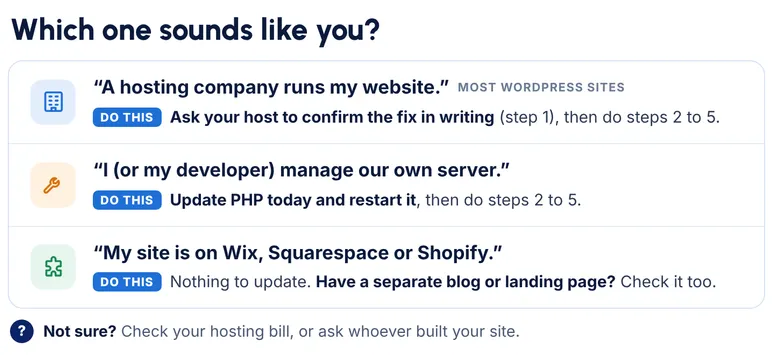
- Ask your host to confirm the fix in writing
- Check your site for unusual changes made since October 17, 2026
- Your SiteLock account needs no action
For reference: the flaws are known as PHP2Shell (CVE-2026-109618 and CVE-2026-109619). PHP released fixes on October 21, 2026.
For how SiteLock responded see, PHP2Shell: How SiteLock responded and what to check on your website
5 quick checks for your website
Your website may run on a separate server with its own version of PHP, usually managed by your hosting provider. If your site runs on Wix, Squarespace or Shopify, the platform manages this for you. If your site uses PHP, take these 5 steps this week:
- Confirm your host has patched PHP. Ask your hosting provider to confirm your site's PHP includes the fix. You can use the message below. Patched versions include PHP 8.5.12, 8.4.27, 8.3.36 and 8.2.35
- Upgrade if you're on PHP 8.1 or older . These versions have reached end of life and no longer receive regular PHP updates. Ask your host about moving to PHP 8.3 or newer.
- Look for signs of unusual activity. Check for admin users you don't recognize, new plugins or files or pages you didn't create. Not sure what to look for? Open a support ticket and our team can review your site.
- Secure your logins. Turn on two-factor authentication for your hosting, website admin and email accounts and remove access for anyone who no longer needs it.
- Confirm you have a recent backup. Make sure it's stored off your server and that you can restore it.
Updating WordPress or your plugins won't fix this issue on its own.
The fix comes from updating PHP itself, which is typically handled by your hosting provider.
Message you can send your host:
Hi, please confirm whether my website [your domain] is patched for the PHP vulnerabilities CVE-2026-109618 and CVE-2026-109619. Which PHP version is my site running, does it include the fix, and was PHP restarted after the update? Thank you.
What not to do
- Don’t treat a WordPress or plugin update as the fix. PHP itself has to be updated
- Don’t rely on the version number alone. Hosts often apply fixes without changing the number, so ask for written confirmation
- Don’t download “test” or exploit code from the internet to check your site. It can do real damage
We're here to help
If you have questions or need help checking your site, open a support ticket from your SiteLock dashboard or call our support team at (844) 217-0577.